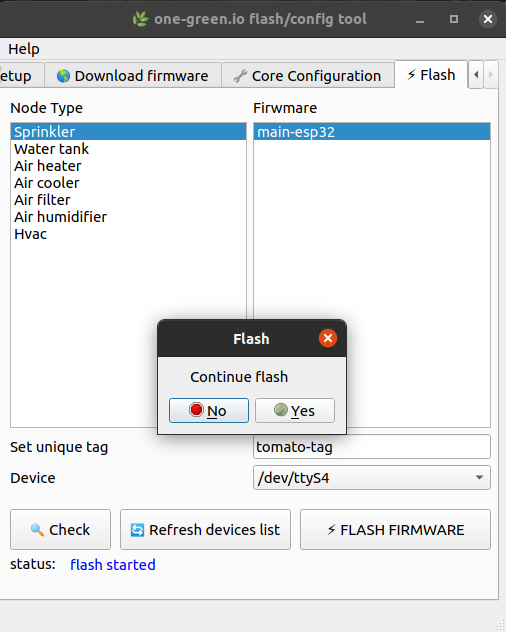
Use Flash tool
Warning
Application start will fail if Git is not installed. Ensure Git is installed (in many linux git is already installed)
Download Git :
macos : https://git-scm.com/download/mac
windows : https://git-scm.com/download/windows
Execute
./iot-flash-config-tool
# logs will be printed like below
DEBUG:default-logger: loading ui
DEBUG:default-logger: ui loaded
DEBUG:default-logger: loading handlers classes
DEBUG:default-logger: listing usb tty
DEBUG:default-logger: port list ['/dev/ttyS4']
DEBUG:default-logger: loading handlers classes: done
DEBUG:default-logger: linking button to actions
DEBUG:default-logger: linking button to actions done
& "c:\<binary-location>\iot-flash-config-tool.exe"
# logs will be printed like below
DEBUG:default-logger: loading ui
DEBUG:default-logger: ui loaded
DEBUG:default-logger: loading handlers classes
DEBUG:default-logger: listing usb tty
DEBUG:default-logger: port list ['/dev/ttyS4']
DEBUG:default-logger: loading handlers classes: done
DEBUG:default-logger: linking button to actions
DEBUG:default-logger: linking button to actions done
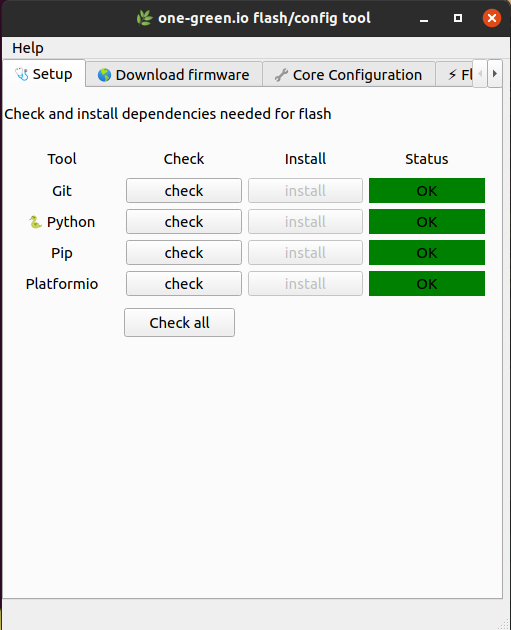
Dependencies check
To flash, some binary are required , you can check if these binaries are available on your computer. App will also help you to install dependencies.
Warning
If you are installing Python 3.x make sure append to PATH is checked
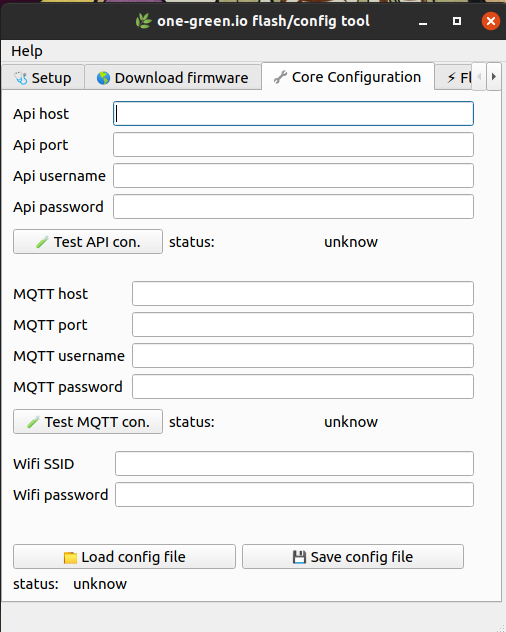
Set Core and Wifi parameter
Set One-Green Core and Wifi parameters.
Tip
You can save and load config file, the file format is YAML
Warning
Nothing is encrypted keep this file in safe place